
ProductImage Pro
Just drag & drop a folder. Batch-process product photos into clean square images on your Mac.
ProductImage Pro
A macOS app that batch-processes product photos into clean square images. Just drag and drop a folder — it resizes, renames sequentially, and exports a ZIP automatically.
Full Description
ProductImage Pro is a macOS app built to speed up product-image preparation for online stores. Load an entire folder of photos and standardize them into squares of your chosen size. Tidy up the background, composite logos and text, rename everything sequentially, and export a ZIP — all in one pass. Every step runs locally on your Mac, and your images are never sent anywhere.
Key Features
🟦 Batch Square Conversion
Load a whole folder and resize every image to a square of your chosen size. Margins are adjustable to the pixel, so portrait and landscape photos all come out clean.
🎨 Four Background Modes
Choose from White / Edge Color / Custom Color / Blurred. Blurred automatically switches to a solid fill when the edges are uniform, so white-background products stay crisp and white.
🏷️ Logo & Text Overlays
Composite logo images (PNG/PSD/PDF and more) or copyright text. Place multiple overlays at once and freely adjust position, size, and opacity.
🌫️ Fine Shadow & Styling
Set drop-shadow color, direction, distance, and blur. Text supports font, bold, and color for clear, legible watermarks.
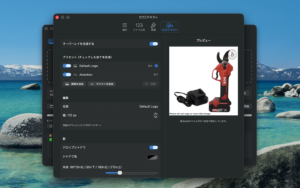
👁️ Live Composite Preview
Background, margin, logo, and shadow settings update instantly in the square preview on the right, so you adjust while seeing the real output.
🔢 Sequential Rename & ZIP Export
Rename to folder_001.jpg style and export all processed images as a ZIP. Digit count and start number are configurable.
Perfect For
- ✅ Standardizing large batches of product photos into squares
- ✅ Matching marketplace image specs (Amazon, Rakuten, etc.)
- ✅ Adding logos or copyright across many images at once
- ✅ Automating post-shoot work (resize, rename, compress)
Supported Formats
| Type | Formats |
|---|---|
| Input images | JPEG / PNG / TIFF / HEIC (WebP where supported) |
| Output images | JPEG (square, variable size/quality) |
| Logo images | PNG / JPEG / TIFF / HEIC / PSD / PDF / AI |
Technical Specifications
- macOS 14 Sonoma or later
- Apple Silicon / Intel
- Fully local processing (no network access)
- App Sandbox with minimal entitlements
- Save/switch setting profiles, English & Japanese
Privacy First
ProductImage Pro does everything on your Mac. Images and data are never uploaded to any server, and there is no tracking or data collection of any kind.
Pricing
Free
Download
Support
For questions or bug reports, please use our contact form.